
At a glance
- A downloaded/staged update is different from an update fully applied and rebuilt.
- Normal updates preserve saves and INI, while manual deletion/imports have different effects.
- Use release notes for the specific fix and platform limits, not just a newer version number.
Where to check NX2navi updates
Open the developer's GitHub Releases or the launcher's update area. Confirm the repository owner, selected release/channel and actual asset before downloading. A third-party page calling a file latest is not proof of the current official release.
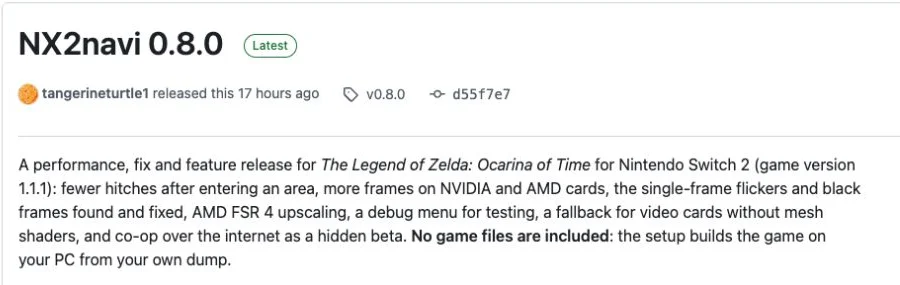
The historical table here ends at the referenced v0.8.0 release. It deliberately does not turn that reference into an evergreen claim that no newer version exists. Review the live source when making an update decision, especially for graphics features, Linux packaging or a specific crash.
Existing users should not treat every release asset as a separate manual installer. The launcher uses app/runtime components and a manifest in its update workflow. For a fresh Windows installation, use the Setup route explained in Download and Install.

Official NX2navi release history
These dates come from the releases' published_at timestamps in UTC. They are software-history facts, not publication or editing badges for this website. Each summary describes the main theme; read the complete official note for testing limits and known issues.
A release-note fix is limited to its stated behavior. For example, one-frame rendering fixes do not mean every persistent black screen is resolved. An implemented hardware fallback can also retain a lack of direct target-hardware validation.
| Release | Official publication (UTC) | Documented focus |
|---|---|---|
| v0.8.0 | 2026-11-11 15:17:12 | Performance, particular black-frame/crash fixes, FSR 4 and mesh fallback with testing limits. |
| v0.7.1 | 2026-11-10 16:25:45 | Open-area performance, first-use pauses and texture detail. |
| v0.7.0 | 2026-11-10 13:06:24 | Town performance, DLSS multi-frame generation and save sharing. |
| v0.6.1 | 2026-11-09 16:49:13 | Fixes and updates preserving compilation objects/shaders. |
| v0.6.0 | 2026-11-09 14:13:52 | HDR, prompts, rebuild and memory/crash work. |
| v0.5.0 | 2026-11-08 03:20:19 | Fog and lighting fixes. |
| v0.4.0 | 2026-11-08 01:34:05 | Initial public release and local Windows build path. |
How the launcher applies an update
The documented workflow checks the official channel, retrieves the manifest-specified components over HTTPS and validates expected size/digest and extraction paths. It stages files before switching the launcher, then rebuilds the changed game components and prepares necessary graphics work. A network download finishing is only part of that sequence.
The running game is not rebuilt underneath an active session. A staged update can wait until the game stops. If automatic installation is disabled, use the Updates controls when ready; a notification or staged package is not the same as completed installation.
The launcher replaces a completed new executable after the relevant build succeeds. Keep the previous working state and any failure report rather than manually mixing components from several releases. The v0.8.0 notes specifically improve handling of upgrade compilation failures so an existing installation is not incorrectly treated as absent.
Read the applicable release note
Identify the fix/feature relevant to your system, compatible input and known platform limitations.
Preserve personal state
Export a save and keep the current INI before significant changes, especially if you also plan manual operations.
Let the launcher acquire and stage
Use its actual update progress and diagnostics; do not separately extract every asset into arbitrary folders.
Close the game and finish the build
Allow staged changes, changed compilation work and graphics preparation to complete before evaluating the new version.
Verify the resulting game
Confirm the running version, load your save and repeat the relevant scene. Record whether the specific symptom changed.
Why some updates rebuild more than others
The launcher can retain compatible inputs, generated objects and prepared graphics work, making incremental updates different from a first build. But compiler/dependency changes, shared headers or shader seeds can invalidate more work. There is no basis for promising every update takes only seconds.
With Keep Build Cache off, generated C/object work can be removed while state remains. The documented workflow can still update without asking for the dump again, but may need more recompilation. Do not infer that a larger rebuild means the update has lost all user data.
Shader preparation and driver warm-up can also recur after changes. Distinguish a long active preparation task from an explicit failure using stage messages and logs. Performance explains first-visit effects after a successful update, while installation errors covers a build that actually stops.
What happens to saves and settings?
The normal launcher/game update path preserves saves and the INI. That is still a reason to keep an independent backup: importing another save, replacing a profile manually or deleting the output folder are different actions with different consequences.
Use the save-files guide to export the intended progress. The default diagnostic export includes logs/settings; turn that option off for a plain save. Keep the backup outside a folder you may replace. For configuration, copy the existing nx2navi.ini instead of assuming a complete preset is necessary.
After updating, confirm the game folder and account if progress appears missing. An alternate installation can look like a reset while the original profile still exists elsewhere. Do not immediately import an old backup over new progress before identifying which installation is running.
Update failures, retries and rollback limits
Keep the actual failed stage and Copy Report. A GitHub rate limit has a wait window; repeatedly pressing refresh does not bypass it. A network/certificate failure also does not establish that the old installed game is broken. Follow the log's recovery time and the documented retry route.
If an upgraded launcher cannot start, the documented process can revert to a previous launcher. That does not establish that arbitrary game-version downgrades are safe for every save or component mix. Keep those two meanings of rollback separate.
For compilation failure, preserve the previous executable and user data while diagnosing the named tool/path/resource problem. For a successful update followed by a runtime crash, preserve the new native log before relaunching and compare the same scene using crash troubleshooting. Report actual outcomes rather than saying the update fixed something simply because it installed.
| Situation | First action | Avoid assuming |
|---|---|---|
| GitHub limit / download failure | Read the wait/retry diagnostic and preserve the current install. | Refresh can bypass a rate limit. |
| Rebuild fails | Keep Copy Report and the old playable state where present. | Deleting the whole output is required. |
| New launcher fails to start | Use the documented launcher recovery behavior. | This proves every game downgrade is safe. |
| Game now crashes | Save the native log and compare a repeatable trigger. | The launcher log alone explains every runtime failure. |
COMMON QUESTIONS
Frequently asked questions
Where is the latest NX2navi release?
Check the live official GitHub Releases list and the launcher's selected update channel. This page's historical reference ends at v0.8.0 and is not a claim that no newer version exists.
Do I need to run Setup for every update?
Existing installations normally use the launcher update workflow. Setup is the usual new Windows installation entry; the release's component ZIPs have separate roles.
Will updates erase my saves or INI?
The documented ordinary workflow preserves them. Keep backups before significant changes, and distinguish updates from save imports or manual folder deletion.
Why does an update compile again?
Changed code, compiler/dependencies, shared headers or graphics preparation can require additional work even when other cached work is reused.
Can an update apply while I am playing?
The workflow stages changes and waits for the game to stop before the relevant switching/rebuild work. A staged update is different from a completed update.
Can I freely downgrade to any version?
The documented launcher-startup fallback is not a universal guarantee for arbitrary game downgrades or mixed-version files. Preserve state and follow project guidance.
SOURCE MATERIAL
Official sources
Use these project references to check the documented behavior and applicable software version. Hardware results and unresolved reports are identified in the relevant sections.