
At a glance
- Record whether the process still runs, audio continues and menus/HUD remain visible.
- Copy game-folder logs/nx2navi.log before another launch overwrites useful evidence.
- Check the actual Vulkan/driver error and last configuration change; avoid random fix DLLs.
Identify the type of NX2navi black screen
Describe the first visible failure rather than using black screen as a complete diagnosis. Did a window open? Did the title appear? Is only the 3D world missing while text remains? Does the process freeze or exit? Each detail helps separate initialization, rendering and gameplay failures.
If the process closes, keep the exit/FATAL context and use crash troubleshooting. If no playable game was built, return to installation errors. A runtime display setting cannot explain a tool-download failure that occurred before the game existed.

| Symptom | Useful observation | First evidence |
|---|---|---|
| No title / black startup window | Whether the process remains alive and audio starts. | Game log, selected GPU and initialization messages. |
| HUD visible, 3D world black | Whether menus and text still render. | Rendering/shader error and exact scene. |
| Cutscene becomes black and hangs | Which scene, trigger and later process behavior. | Reproduction steps and full relevant log section. |
| Single brief black flash | Whether play continues and when the frame appears. | Version, reconstruction mode and repeated trigger. |
| Image lost after a setting change | The one changed value and restart state. | Backup INI plus the resulting diagnostic message. |
Black screen before the title screen
Start by checking the game output directory's logs/nx2navi.log. Keep it before restarting. A launcher log can explain how the game was started but is not a substitute for the native game's graphics and runtime diagnostics.
Compare the selected GPU, driver and Vulkan extensions with system requirements. Vulkan 1.3 alone is insufficient: the port requires specific extensions, while mesh-shader fallback has documented testing limits. On a hybrid system, verify which device the game actually selected rather than assuming the discrete GPU is in use.
The referenced release notes describe an integrated-AMD host-memory-heap limitation that can fail at the title screen. Lowering resolution is not a guaranteed remedy for that documented memory requirement. Likewise, a driver update should be tested against the actual error, not presented as a confirmed cure for every startup report.
Persistent cutscene or 3D rendering failures
Issue #202 reports a v0.5.0 RTX 4060 cutscene black screen followed by freezing/exiting. Its author tried 120 and 60 FPS without resolving the problem. This is evidence against recommending a frame-cap change as a universal fix for that symptom.
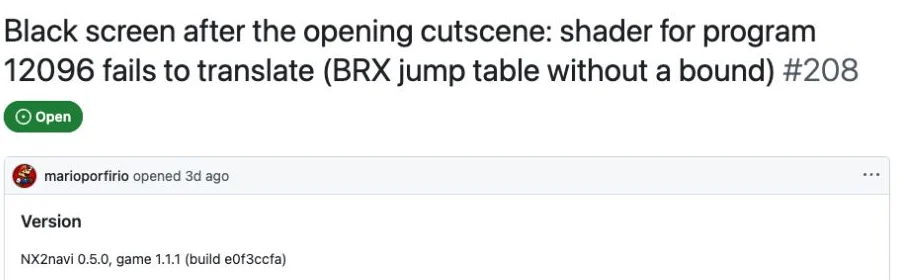
Issue #208 describes v0.5.0 through Proton on Linux: menus/HUD appeared while the 3D world was black, with a specific shader-translation failure. That is a particular older compatibility-layer report, not proof that all native Linux installations or NVIDIA cards have the same fault.
For your own report, identify the exact scene and whether the failure is repeatable from the same save. Keep the first relevant shader/FATAL message and the platform path. Do not apply a solution from a visually similar issue unless its version, configuration and logged cause actually match.
| Historical report | Specific evidence | What cannot be inferred |
|---|---|---|
| #202 / v0.5.0 | Cutscene failure on RTX 4060; cap changes did not resolve it. | That a 60 FPS cap fixes all cutscene black screens. |
| #208 / v0.5.0 | Proton/Linux, visible HUD and shader translation error. | That this proves a native Linux universal failure. |
| Current reproduction | Your scene, system and actual diagnostic log. | That an older issue's cause automatically applies. |
Brief black flashes are a different symptom
Issue #253 reports periodic full-screen black flashes while turning the camera on v0.6.1 with an RTX 4080 Super. A transient rendering defect differs from a permanently black startup window or a cutscene that never resumes.
The v0.8.0 release notes report fixes for particular one-frame black images, often associated with FSR, as well as certain lighting defects. Cite those exact symptom classes rather than writing all black-screen bugs fixed. The cited historical issues remained open when reviewed; an open status also does not prove that the newest version still reproduces every old problem.
Compare your installed version and graphics mode with the release notes. If a newer release addresses the specific defect, follow updates and then retest the same camera/scene. Record whether the transient symptom changed without claiming unrelated persistent failures are solved.
Use a reversible display-check sequence
If the failure began immediately after a configuration edit, close the game and restore that one value from the backup. For OoT resolution, confirm game_aspect and game_res; generic output_res and render_scale do not provide the expected image controls. Restart for settings documented as restart-only.
Keep the test narrow: compare a known-working reconstruction/HDR mode before changing several advanced flags. A menu option and the effective driver/library state can differ, so retain initialization messages if a feature cannot start. Graphics settings explains the platform and GPU conditions.
Do not blindly delete caches, disable protection or fetch a black-screen-fix DLL from an unrelated site. Those actions do not identify the cause and can remove useful evidence or create another problem. If the known-working baseline also fails, move from guessing settings to collecting a reproducible report.
Preserve the failing evidence
Copy the native game log, note version/system and record which picture elements remain visible.
Check the applicable requirements
Inspect selected GPU, driver and extension errors. Distinguish a requirement failure from a rendering defect.
Undo the last documented change
Restore the known-working INI value with the game closed, then restart and repeat the same scene.
Compare the relevant release note
Only associate a fix with its actual symptom class. If the problem remains, retain the reproduction and report it.
Prepare a useful black-screen report
Include the port/game versions, OS, GPU, driver, launch method, exact scene and the first failing event. Describe whether audio, HUD, menus and the process continue. Attach the relevant log section and steps that another person could follow, rather than only a photograph of a black rectangle.
The launcher's save export can create a bug-report package containing logs and configuration. Review the archive before sharing; paths and settings can reveal information you did not intend to publish. Do not add game data, keys, generated source or caches. The save-files guide explains the export option and its contents.
If the game remains playable but pauses during transitions, use performance diagnosis instead. A one-frame black defect and a long resource-preparation pause may both look like a momentary interruption, but require different evidence.
COMMON QUESTIONS
Frequently asked questions
What is the first check for a NX2navi black screen?
Classify the stage and preserve logs/nx2navi.log in the game folder before restarting. Note whether the process, audio, menus and HUD continue.
Are brief black flashes the same as a permanent black screen?
No. A transient frame defect, missing 3D scene, startup fault and cutscene hang can have different causes and must be described separately.
Did v0.8.0 fix every black screen?
No such broad conclusion follows from its notes. They identify specific one-frame and lighting fixes, not every persistent startup or cutscene scenario.
Should I lower the FPS cap to fix a cutscene black screen?
Only a matching diagnosis can justify that test. In historical issue #202, changing 120/60 FPS did not resolve the reported failure, so it is not a universal remedy.
Should I delete shaders or download a fix DLL?
Do not use those as generic first steps. Preserve the log, verify requirements and undo the last known configuration change before considering a specific documented remedy.
SOURCE MATERIAL
Official sources
Use these project references to check the documented behavior and applicable software version. Hardware results and unresolved reports are identified in the relevant sections.