
At a glance
- Preserve the native game log before relaunching.
- Codes 70/71 need their actual FATAL context; v0.8.0 documents code 72 for lost video device.
- Separate a reported workaround from an independently reproduced fix.
When is NX2navi crashing?
The same word crash can describe different processes. A launcher exception while downloading tools, a compiler stopping during a build and a native game exiting at the title screen need different logs. Establish which stage completed and which process disappeared before searching for an error code.
If compilation never completed, start with installation errors. If the game remains open with a black image, retain its runtime log and also use black-screen troubleshooting. If it remains playable but pauses, performance diagnosis covers that symptom.

| Failure | Evidence location | Useful context |
|---|---|---|
| Launcher exception | Launcher data/logs/launcher.log and crash.log. | Installer/update job and first exception. |
| Build or compiler stop | Copy Report / launcher failed stage. | Translator/compiler message, resources and paths. |
| Game exits at startup | Game folder logs/nx2navi.log. | Before/after title, selected GPU and initialization. |
| Game exits during play | Same native game log, preserved immediately. | Save/route, trigger and whether repeatable. |
Find and preserve the right crash evidence
Locate the generated game directory selected during installation. Open logs/nx2navi.log and copy it before another launch. The official contribution guidance specifically asks for preservation after a crash; restarting can replace the evidence you need.
The launcher's Settings → Open Logs Folder opens its own logs. Those are useful for launch and update behavior, but do not replace the native game's rendering/FATAL information. A custom game output directory is why there is no single universal LocalAppData path for all runtime evidence.
Keep more than the final exit-code line. The referenced release adds GPU, driver, memory-mode, lazy-writeback and texture-detail context near runtime diagnostics. Preserve the relevant block with the first failure, then remove private paths or unrelated personal information before posting publicly.
Understand exit codes without overinterpreting them
In v0.8.0, the release notes describe video-device loss ending with code 72 and a diagnostic. Codes 70 and 71 should be read alongside their actual FATAL line. Do not map a number from one older issue to one universal hardware diagnosis.
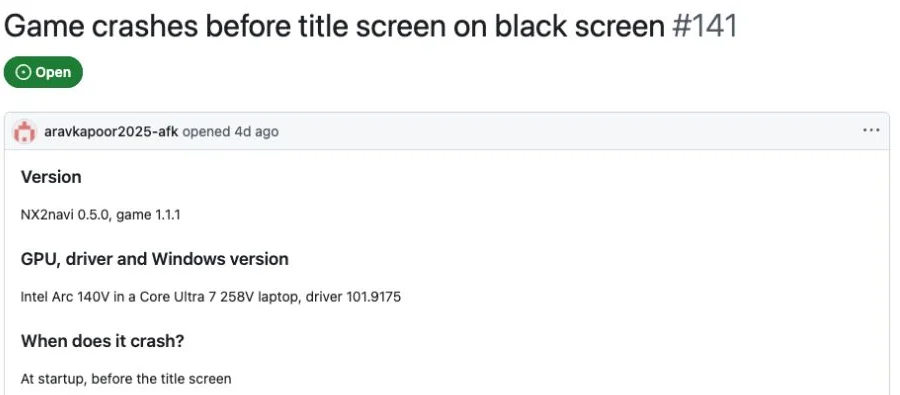
Issue #141 reports v0.5.0, Intel Arc 140V and code 71 with an igvk64.dll access exception. The module and environment make that report specific; code 71 alone would not reconstruct it.
Issue #80 reports an RX 6500 XT on v0.5.0 with alternating 70/3221226505 exits after the opening. The author still saw failure after updating the driver. That does not prove that driver updates never help, but it prevents claiming that this issue was fixed merely by updating one.
| Code / report | What is established | Still needed |
|---|---|---|
| 72 / v0.8.0 | Release documents lost-video-device diagnostic handling. | Actual cause, scene and driver/log context. |
| 70 or 71 | A runtime failure with accompanying FATAL evidence. | The actual FATAL/module and system details. |
| Historical issue #141 | Specific Intel Vulkan-module exception. | Whether a current installation reproduces the same error. |
| Historical issue #80 | A particular older AMD startup/gameplay report. | A matching reproduction rather than a guessed universal remedy. |
Launcher startup failure is a separate recovery path
The official launcher describes a new-version startup check and fallback to its previous version. Its internal start.pyw exit code 86, or an early startup error, belongs to that launcher-switching mechanism. It should not be mixed into a table interpreting native game exit codes 70/71.
Use data/logs/launcher.log and crash.log for a launcher that fails to open after its own update. Preserve the existing game/profile while investigating. A working launcher fallback does not establish that arbitrary game downgrades, mixed DLL versions or older save formats are safe.
Investigate startup crashes with requirements and recent changes
Confirm OS architecture, CPU requirements and the actual selected Vulkan GPU/driver using system requirements. An API version label alone does not prove the required extensions or sufficient host-memory heap. The release's integrated-AMD limitation and mesh fallback testing boundary remain relevant.
If the failure began after a configuration change, close the game and restore only that change from a known-working INI. A copied experimental flag or a platform-inappropriate library is a hypothesis to test, not a reason to delete saves. The settings guide explains file locations and overrides.
Historical Issue #83 describes a v0.5.0 RTX 4070 Ti startup failure whose author reported avoiding it after rebooting. That is a reported workaround in one environment, not a permanent fix guaranteed for every startup crash. Preserve evidence before trying any restart that loses the original state.
Gameplay, graphics-device and memory failures
For a crash during play, record the save, area, time of day and immediate action. Does a specific enemy encounter trigger it? Does it happen while loading a save or entering a field? A repeatable route is much more actionable than sometimes closes.
v0.8.0 reports a lost-device fix for a particular nighttime Hyrule Field load scenario and a limited developer test sample. That is useful version-specific evidence, not a guarantee that every load-related crash is fixed. Retest the same trigger after a relevant update and retain the outcome.
The release also changes the default GPL behavior on RX 6000-and-earlier AMD cards for a particular combat crash, while noting the absence of direct target-card validation. Do not turn gpl=1 into a general optimization recommendation. Likewise, observe RAM/VRAM/commit pressure instead of inferring memory exhaustion from any exit.
Prepare a reproducible crash report
Use the developer's official issue tracker for software faults. Search for the actual FATAL text and matching environment before assuming a visually similar report is the same bug. The historical issues cited here were open when reviewed, which neither certifies a fix nor establishes current reproduction.
The launcher's save export supports a bug-report ZIP that can include the game log and INI. Review the content before sharing; configuration and logs may contain personal paths. A save can be useful for reproducing a scene, but an entire installation, game input, keys, generated source or shader cache should not be added.
After submitting evidence, keep your independent save/configuration backup and a record of the working version. Updates explains staged launcher changes and rebuilds; Save Files explains export/import differences that matter when preparing a reproduction.
Identify the environment
Port version, game version, OS, GPU, driver and launch method. Use the in-game version information if accessible.
Describe the trigger
State startup versus gameplay, the exact scene and minimal sequence. Explain whether it repeats from the same save.
Attach relevant diagnostics
Preserve the native log before relaunching and include the FATAL block with context, not only a numeric code.
State what changed
List the one configuration/driver/update comparison tried and its actual result, marking untested ideas as untested.
COMMON QUESTIONS
Frequently asked questions
Where is the NX2navi game crash log?
The native game writes logs/nx2navi.log under its selected game output directory. Copy it before another launch; launcher logs are stored separately.
Does code 71 always mean my GPU is unsupported?
No. Keep the associated FATAL message, module and hardware/driver context. A historical Intel report does not define every code-71 failure.
What does code 72 mean in v0.8.0?
The release documents lost-video-device termination with a diagnostic. The log and scene are still needed to investigate why the device was lost.
Should I reinstall everything after a crash?
Not as a first diagnosis. Preserve the log, identify the failed process and restore a recent configuration change if relevant. Keep saves before manual folder operations.
What should I send with a bug report?
Versions, OS/GPU/driver, a repeatable scene and the relevant preserved log. Review any exported report and exclude game data, keys and unnecessary private information.
SOURCE MATERIAL
Official sources
Use these project references to check the documented behavior and applicable software version. Hardware results and unresolved reports are identified in the relevant sections.