
At a glance
- Keep the job/step name and error text, not only the build-stopped headline.
- A compiler/download failure before launch does not prove that the GPU is incompatible.
- Fix the named problem and use Try Again before considering a full reinstall.
Which installation stage actually failed?
The launcher describes distinct stages: Gather Build Tools, inspection/processing of the game input, compilation, Prepare the Shaders, optional button-prompt preparation and Check the Game Files. Their messages lead to different checks. A progress bar paused on a slow local task is not the same as an explicit failed job.
Use Copy Report when offered and retain the error with surrounding lines. The launcher's Settings → Open Logs Folder leads to its own logs, including data/logs/launcher.log; a launcher exception can also produce data/logs/crash.log. The completed game's logs/nx2navi.log is a different runtime log.

| Failed stage | Most useful evidence | First direction |
|---|---|---|
| Gather Build Tools | Download URL/component and network/certificate/import error. | Network, trust/time and the named tool. |
| Inspect / validate game | Expected versus actual input/version message. | Supported Game Files, not graphics quality. |
| Translate / compile | First translator/compiler error, paths and resource context. | Toolchain, input processing, memory or storage. |
| Prepare the Shaders | Preparation counts, recent messages and driver context. | Work still progressing versus actual graphics failure. |
| Check the Game Files | romfs-check.json and exact flags. | Expected stand-ins versus unexpected damaged content. |
Unsupported game files and validation errors
The referenced player workflow expects compatible game version 1.1.1. An error saying the input is not that version is a compatibility mismatch, not a request to rename the file. Compare the actual input path and documented game identifiers using Game Files. Port version and game update version are different fields.
If no input is found, inspect the launcher's selected file and the local location. Automatic discovery can miss a file or choose another candidate; it does not establish compatibility. Keep your original player-owned input intact while checking the supported route.
An integrity failure needs its actual message. File size alone cannot certify content, and a later compilation failure does not retroactively prove the input is bad. Do not edit a header or build identifier to bypass the validation stage.
Build-tool downloads, certificates and imported modules
For a tool-download failure, retain the named component and HTTPS error. The launcher documentation describes Python/OpenSSL certificate validation and a Windows validation fallback. If both fail, the resulting clock/certificate diagnostics are more useful than repeatedly restarting Setup.
Check system date, time zone, normal Windows trust updates and whether a managed HTTPS inspection setup is involved. Do not disable certificate verification as a generic fix. A server limit or temporary network outage should be handled according to the actual message, without assuming the downloaded game input is responsible.
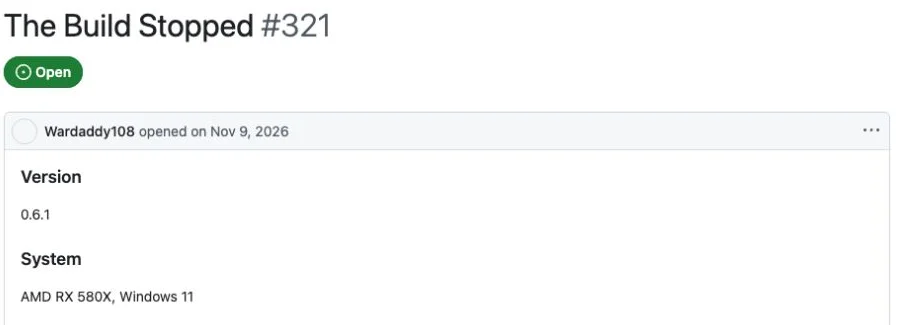
Historical Issue #321 reports v0.6.1 extracting zbic 1.0.1.post1 but failing to import it during Gather Build Tools. The reported machine's GPU model is not evidence of a graphics-runtime cause at that stage. Keep the module/import traceback rather than downloading random DLL files.
Compilation, Linux dependencies and shader preparation
On standard Windows Setup, the launcher prepares its normal toolchain. Do not add manual Linux compiler instructions simply because the word compile appears. For the separate native Linux route, an error such as clang is not on PATH names a host compiler requirement; nx2navi_xlate is missing can mean a source checkout needs the translator build step.
Header files and runtime libraries are different dependencies. A missing SDL3 header is not repaired by copying an arbitrary library from another operating system. Follow the matching Linux instructions and distribution packages when that is your actual platform.
Prepare the Shaders can take time. The launcher documentation describes periodically refreshed activity text and a still-running notice when counts do not change for several minutes. Look at recent logs and CPU/disk work before declaring a fixed timeout. If an explicit error appears, preserve it with the selected GPU/driver context.
| Message category | What to inspect | Avoid |
|---|---|---|
| Missing compiler/linker | Correct platform, PATH and official toolchain stage. | Mixing Windows and Linux packages. |
| Missing header/library | The exact dependency and development/runtime role. | Random replacement DLLs. |
| Translator missing | Kit contents versus source-build prerequisites. | Treating it as a universal NUP corruption message. |
| Preparation looks idle | Recent log text, activity and actual error state. | Killing tasks solely because a fixed number of minutes passed. |
Disk-space and destination-folder problems
When the launcher says it needs additional space, read which destination drive it names. The installer file, launcher program and generated game can occupy different locations. Free space on C: does not resolve a full output volume selected elsewhere.
Allow space for working files and the generated game, not just the downloaded installer. Official v0.8.0 documents give different game-size estimates, so use them as planning guidance and respect the actual launcher's preflight check. The requirements page explains those storage roles.
v0.8.0 reports fixes for paths containing commas, transient mapped-drive disconnects and earlier free-space detection. Those notes should be presented as version-specific changes, not current mandatory workarounds for everyone. If the same symptom remains, retain its new log and path context without sharing private directory details unnecessarily.
Understand Check the Game Files results
The documented game-file check writes romfs-check.json in the generated game folder. Some texture problems can receive a stand-in, while unexpected non-texture corruption may require a clean compatible input. The documentation also describes four expected flagged entries that need no action.
Consequently, any flag does not automatically mean the entire input is unusable. Read the actual marked item and the explanation provided by the tool. Preserve the report before rebuilding, and do not distribute the underlying game files as part of a support request.
If validation and build both succeed but the game later exits or shows a black image, move to crashes or black-screen diagnosis. Keep the successful build result distinct from the runtime failure.
Recover without deleting useful progress
After recording the failed step, correct the specific problem and use Try Again. The documented workflow can reuse completed work. v0.8.0 includes changes to preserve finished compilation objects after interruptions and avoid treating an installed game as absent when an upgrade compilation fails.
A failed upgrade may leave an older playable executable while Rebuild the Game shows unfinished work. Preserve that distinction before deleting the destination. A full reinstall can discard evidence, caches or user data without addressing a certificate or input mismatch.
For a public report include the launcher/port version, OS, failed job, actual error, relevant paths with personal details removed, storage/memory context and steps already tried. Keep keys, game dumps, generated source and caches out of the attachment. Safety covers security warnings that occur before installation, which should not be automatically reclassified as a build error.
Save Copy Report and logs
Capture the failed job and underlying exception before another attempt changes the evidence.
Correct the matching cause
Resolve the named input, dependency, destination or network problem rather than applying unrelated graphics tweaks.
Use the documented retry
Allow the launcher to reuse completed work. Keep a backup before manual folder operations.
Retest the same stage
If it fails again, retain the new message and explain what changed; do not say a workaround succeeded without a completed result.
COMMON QUESTIONS
Frequently asked questions
What does The build stopped mean?
A build job failed. The stage label and underlying log message identify the cause; the headline alone is not a diagnosis.
Should I reinstall after every NX2navi install error?
No. Preserve the report, correct the named problem and use Try Again first. Completed work can be reused, and deleting folders can remove useful evidence.
Why is my input rejected as the wrong version?
The referenced player workflow validates the supported game update and content. Check the actual input and Game Files guide; renaming a file does not change its version.
Should I disable certificate checks or antivirus?
Do not use that as a generic installation fix. Keep the actual network/security message and verify source, system time, trust and the named failing component.
Does a shader stage with unchanged counts mean it has failed?
Not by itself. The documentation describes long-running preparation and status notices. Check recent activity and explicit errors rather than using a fixed timeout.
SOURCE MATERIAL
Official sources
Use these project references to check the documented behavior and applicable software version. Hardware results and unresolved reports are identified in the relevant sections.