
At a glance
- Use the developer's release page, not a third-party download mirror.
- New Windows users need the Setup EXE; an existing launcher can manage updates.
- The software package contains no game data. Prepare your own compatible inputs separately.
Where to find the official NX2navi download
The authentic source for an NX2navi download is the release area of tangerineturtle1/NX2navi on GitHub. Start there even when another website mentions the same filename. A familiar project name, a green button or a copied checksum does not establish who supplied the file.
Open the official GitHub Releases page, select the release you intend to use and read its installation notes before expanding Assets. This lets you connect the file to a particular software release and platform. A prerelease is a separate choice, not automatically a safer or more suitable installation.
Check the repository owner
Confirm that the address belongs to github.com/tangerineturtle1/NX2navi. A similarly named repository or an installer attached to a comment is not the same source.
Read the chosen release
Use its install-or-update instructions, then expand Assets. If the list fails to appear, reload the official page rather than selecting a replacement file from an unrelated mirror.
Save the intended installer
Choose the Setup EXE for Windows and save it in a folder you can find again. Avoid running it directly from an archive manager or confusing several identically named downloads.
Which NX2navi download file should you choose?
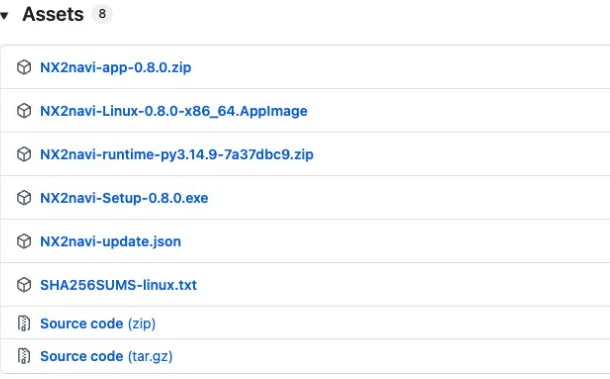
A release can contain the installer, the launcher's application package, its Python runtime and a machine-readable update manifest. Their presence does not mean they should all be downloaded manually. The v0.8.0 release provides the following useful naming patterns; future releases should be read against their own instructions.
| File pattern | Purpose | New Windows installation? |
|---|---|---|
NX2navi-Setup-<version>.exe | Installs the Windows launcher and starts the setup path. | Yes: the normal starting point. |
NX2navi-app-<version>.zip | Application payload used by the launcher/update system. | No: not the ordinary first-install package. |
NX2navi-runtime-<id>.zip | Runtime component for the launcher. | No: not a separate game installer. |
NX2navi-update.json | Manifest describing update components. | No: not an executable. |
NX2navi-Linux-<version>-x86_64.AppImage | Linux-specific distribution when supplied. | No: follow the Linux route. |
| GitHub Source code ZIP / tar.gz | Repository source snapshot. | No: a developer/source-build route. |
New installation or an existing launcher?
For a first installation, the Setup EXE is the documented Windows entry point. If you already have a working launcher, check its Updates function before downloading another installer. The update guide separates launcher replacement, incremental game rebuilding and preserving an existing setup.
Keep the project release separate from the game update. Downloading a newer launcher does not make every game dump compatible. The supported input is checked during installation, and a mismatch needs to be resolved by reviewing the file requirements, not by repeatedly downloading random versions.
If a release filename differs from the pattern shown here, read that release's own instructions. Do not rename an unknown file to make it look correct. A trustworthy download decision should leave you able to identify the repository, release, asset and platform without relying on the appearance of a third-party page.
Verify your NX2navi download before opening it
After saving the installer, show file extensions in File Explorer and inspect the complete name. A filename ending in .exe is a program, even if the name contains extra words suggesting that it is a document or an archive. If Windows reports an incomplete download, finish or repeat the transfer from the same official asset before opening it.
A SHA-256 digest identifies a particular sequence of bytes. PowerShell can calculate one locally, using the example below after replacing the path and filename with your actual NX2navi download. Calculating a hash does not contact an official verification service and does not declare the program safe.
Compare the result only with a trusted digest for that exact asset. The v0.8.0 assets include a Linux checksum file; do not apply a Linux AppImage digest to the Windows Setup EXE. If no trustworthy reference digest exists for your selected file, record the hash for identification and say that comparison is unavailable.
Get-FileHash -LiteralPath "C:\Downloads\NX2navi-Setup-0.8.0.exe" -Algorithm SHA256If the download page or file looks wrong
When Assets is empty, first distinguish a page-loading problem from the absence of a suitable package. Check that you selected an actual release, expand its asset list and try loading the official page again. A generic Source code entry alone is not a Windows launcher installation.
If the browser blocks or quarantines an NX2navi download, read the exact security message and verify its source. Do not make disabling browser protection or antivirus a routine step. If you cannot establish what file you obtained, leave it unopened and return to the authentic release page.
If a transfer repeatedly fails, record the selected asset, browser message and whether other GitHub assets load. This is different from a build that stops after the launcher has already started; that later problem belongs in installation errors.
What to do after the NX2navi download
The next decision is whether your machine and game inputs are ready. Review system requirements, confirm the supported game files, then follow the Windows installation guide. That page covers the real sequence from Setup to Begin Installation, local compilation, shader preparation and first launch.
Keep the installer and the downloaded software separate from your original game files. The release package supplies tools; the compatible game data comes from you. This website does not provide that data, private keys or a prebuilt game, and no additional download button here supplies the missing game.
COMMON QUESTIONS
Frequently asked questions
Which NX2navi download should a new Windows user choose?
Choose the Setup EXE named in the official release's installation instructions. Application ZIPs, runtime ZIPs and update manifests have separate roles and are not the normal first-install path.
Do I need every file listed under Assets?
No. The Windows launcher manages its components. Downloading every ZIP manually can make the process more confusing without satisfying the separate game-file requirement.
Does the NX2navi download include Ocarina of Time?
No. You must supply your own legally obtained, compatible game files. The installer prepares a local build from those inputs; it is not a bundled game download.
Can the Source code ZIP replace the Setup installer?
It is a repository snapshot, not the standard Windows installer. Building from source requires its own toolchain and instructions. Use the Setup path unless you intentionally need a developer build.
Does a SHA-256 match prove that the installer is safe?
It proves that the file matches the specific reference digest, provided that reference is trustworthy. It does not prove that every behavior of the program is harmless or that a different similarly named file is authentic.
SOURCE MATERIAL
Official sources
Use these project references to check the documented behavior and applicable software version. Hardware results and unresolved reports are identified in the relevant sections.