
At a glance
- The release contains an x86-64 AppImage, while its author explicitly limited Linux testing for that release.
- A packaged application can still require system build dependencies.
- Use Linux paths and logs; a Windows Setup tutorial is a separate workflow.
NX2navi Linux support: what is documented?
The project documents native Linux execution and a Build Kit route. Its v0.8.0 release also supplies a Linux x86-64 AppImage and a Linux checksum list. Consequently, saying there is no Linux download would be inaccurate. Equally, the release notes say the developer had not run that release on Linux: the asset's existence is not a broad compatibility certification.
Treat a community result as evidence for its stated distribution, kernel, GPU, driver and package. Issue #430 concerns an Arch desktop with an i9-13900K, RTX 4090 and Wayland; its author explicitly did not test AppImage, Steam Deck or non-NVIDIA hardware. Those exclusions matter when deciding whether its findings apply to your machine.
This guide explains the documented prerequisites and build sequence. It does not report a build performed by this website. For handheld-specific evidence, use the separate Steam Deck guide.

Choose an AppImage or a native Build Kit
Obtain software through the developer's official releases. Check the platform and matching documentation before launching it. An AppImage is a distribution format, not a substitute for the compatible player-supplied game input explained in Game Files.
The documented AppImage tooling includes Python and pinned Vulkan headers, checks dependencies and prepares additional tools. It can still depend on libraries and compilers supplied by the host. A source checkout introduces another stage: building the translator with the documented .NET toolchain when a ready translator is absent.
| Route | What it supplies | What you still check |
|---|---|---|
| Official AppImage | Linux packaging for the referenced release. | Host dependencies, driver, compatible input and release limitations. |
| Build Kit with translator | Scripts and a prepared translator where included. | Clang/LLD, system libraries, Vulkan and input compatibility. |
| Source checkout | The project source and build scripts. | Translator build, .NET SDK and shader/tool development dependencies as documented. |
Check the system before building
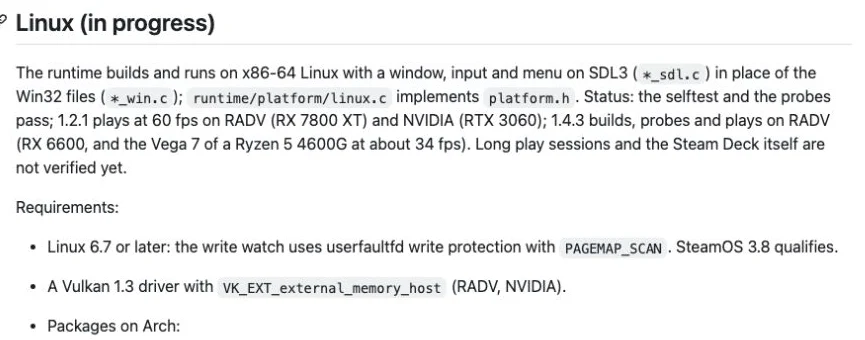
Record the distribution, kernel and graphics driver first. The referenced Build Kit lists kernel 6.7 or later for PAGEMAP_SCAN, x86-64 hardware, Vulkan 1.3 and VK_EXT_external_memory_host. The project's mesh-shader requirement needs qualification: the README lists it, while the release adds a fallback that was not fully verified on real hardware lacking that extension.
A working Vulkan loader alone does not prove all required extensions exist. Query the actual GPU and driver with a trusted Vulkan information tool. Check the device being selected on a hybrid-GPU laptop. See system requirements for the distinction between an API version, an extension and actual game compatibility.
- Verify free space on the actual output filesystem, not only the home partition's nominal capacity.
- Check RAM and concurrent workload before compiling; build parallelism can create substantial memory pressure.
- Keep your original game input separate from output folders and record the first actual build error.
uname -r
uname -m
command -v clang clang++ ld.lld
vulkaninfo --summaryStart an official AppImage and inspect its first error
Select the Linux x86-64 asset in the official release, verify its source and compare its digest with the trusted Linux checksum list where supplied. A locally calculated hash without a trusted reference is only an identifier. The download guide explains that distinction.
In a file manager, review the downloaded file's permissions and executable option. Alternatively, the commands below set the executable bit on that one file and start it from the terminal, where an immediate error can be retained. Replace the placeholder with the actual name you downloaded; these examples do not download or execute anything on this website.
If the package opens, inspect the actual compatible-input and output choices it provides. Reaching a user interface is different from completing a local game build. If it fails, preserve the terminal message: architecture, permissions, missing dependencies and Vulkan initialization lead to different checks.
chmod +x ./YOUR_DOWNLOADED_FILE.AppImage
./YOUR_DOWNLOADED_FILE.AppImageSeparate compilers, runtime libraries and headers
The native route needs Clang and LLD discoverable on PATH. Development headers are distinct from runtime shared libraries: an SDL library sufficient to run one program may not provide the headers needed to compile another. Resolve the named missing component rather than installing unrelated packages until an error disappears.
The official dependency discussion includes SDL3, Opus, libvpx, dav1d, zstd, the Vulkan loader and Vulkan headers. A source checkout also uses shaderc and spirv-tools to prepare runtime shader headers. Package names and versions depend on the distribution, so consult the matching Build Kit instructions and distribution package documentation instead of pasting an Arch command into every Linux system.
A source route without the translator needs the documented translator build, using the .NET 10 SDK and python tools/build_xlate.py. A kit already containing bin/nx2navi_xlate does not need that extra step merely because a source tutorial includes it. Do not make a Windows user install these Linux dependencies for the ordinary launcher path.
Run the documented native build
From the appropriate kit or checkout root, the official Linux example accepts your compatible NUP input and an explicit output directory. Replace the input placeholder with your own actual path. Python's -I requests an isolated Python environment; it does not install missing system libraries or bypass input checks.
The Build Kit suggests reducing parallel jobs on a 16 GB system, for example by adding --jobs 4. This is a memory-pressure adjustment, not a guarantee of success. Let compilation and shader preparation complete before trying to start the generated game.
Validate the chosen input
Use the compatible game version and the build script's actual validation messages. Changing a filename does not change the game version.
Watch the failed stage
Distinguish acquisition, translation, compilation and graphics preparation. Preserve the first error with surrounding lines.
Find the native output
The documented executable is ocarina in the --out directory. Its configuration, profile and game logs belong to that output tree.
python3 -I tools/make_game.py --nup "/path/to/your game.nup" --out ~/Games/Ocarina
~/Games/Ocarina/ocarinaDiagnose a NX2navi Linux failure by stage
Issue #421 records missing compiler/header problems on SteamOS 3.9.5 with an RTX 5070 desktop. It is useful evidence of packaging limitations, but it is not a Steam Deck hardware test. A compiler failure before launch also cannot establish a GPU runtime failure.
| Evidence | Check next | Avoid assuming |
|---|---|---|
| clang is not on PATH | Install/locate the documented compiler using your distribution's supported method. | That a Windows dependency bundle will work on Linux. |
| Header or library missing | Identify whether the compiler requests a development header or runtime library. | That an AppImage must contain every dependency. |
| nx2navi_xlate is missing | Confirm kit contents; follow the translator stage for a source checkout. | That the input game file is corrupt. |
| Game exits after a successful build | Preserve output-directory logs/nx2navi.log and inspect the runtime failure. | That repeating compilation will necessarily fix it. |
Keep Linux graphics and configuration platform specific
Windows FidelityFX DLL instructions do not directly apply to the native Linux build. Linux NVIDIA DLSS uses the driver/NGX path and appropriate Linux libraries, not a copied Windows DLL. Likewise, frame-generation setting names and availability can differ between platform documentation.
For this game, use game_aspect and game_res when investigating picture shape and internal height. Generic output_res and render_scale entries do not control the OoT image as readers might expect. Back up nx2navi.ini beside the executable, change one documented setting and inspect its actual effect after a restart.
Do not start diagnosis by removing graphics caches. The documented NVIDIA cache beside the game can reduce repeated preparation; deleting it can create fresh pauses and remove a useful comparison baseline. Continue to settings, graphics settings or performance once the build and first launch work.
COMMON QUESTIONS
Frequently asked questions
Is there a NX2navi Linux AppImage?
Yes. The referenced v0.8.0 release lists an x86-64 AppImage and Linux checksum file. Its release notes also limit Linux testing, so verify the current release and your host dependencies.
Does an AppImage contain every build dependency?
Not necessarily. The documented tools still check host requirements, and public reports identify missing compilers or headers. Read the actual missing-component error.
Where does the native Linux build put the game?
The --out argument chooses the output. The documented example uses ~/Games/Ocarina and produces the ocarina executable there, together with its game configuration and data directories.
Can I use the Windows Setup instructions on Linux?
Those describe a different launcher/toolchain path. For native Linux use the matching AppImage or Build Kit documentation; a compatibility-layer experiment is not the same as native support.
Does a successful Linux desktop report prove Steam Deck support?
No. Hardware, SteamOS dependencies, controls and performance need separate evidence. The cited desktop reports do not establish handheld results.
SOURCE MATERIAL
Official sources
Use these project references to check the documented behavior and applicable software version. Hardware results and unresolved reports are identified in the relevant sections.